Putting Wax inside something real
Jedi Academy came out in 2003, developed by Raven Software. It has a renderer, audio, networking, and all the other machinery a complete game needs. I wanted to see what putting a slice of Wax inside a game like that would involve, while letting the existing engine keep doing its job.
Working with an AI agent, we chose player movement. The game’s source is maintained by the OpenJK project, and its multiplayer game logic already has a boundary with the engine. That gave us somewhere to start without having to take the whole game apart.
The agent handled both the port and the integration. It connected the engine’s player state and inputs to the Wax movement code, then passed the result back to the engine. Anything the movement still needed from the engine, like animation or collision tests against entities, went through declared host functions.
About two hours after starting, we had movement running inside the game. Walking, jumping, sliding, wall runs, on both the server and the client. Wax was doing work the game needed every tick, with the rest of Jedi Academy carrying on around it.
Poking around in a playthrough
With that in place, we could record some playthroughs and start poking around in the results. I was curious what we could do with this, but I didn’t have a particular goal in mind yet. This was still an experiment to see what integrating a slice of Wax into something big might look like for our users.
The session below gave us about twenty thousand movement ticks in a 2.6 MB recording. The movement code only keeps the state it needs to move the player; Wax creates the history. Because the calls between Wax and the engine cross a boundary the runtime understands, it can record what the engine told Wax and supply those same answers later. We could close the game and still reconstruct its movement on a machine that had never had Jedi Academy installed.
So we had a playthrough we could write new code against. A query in Wax can use the types and fields from the program in the recording. In this case that meant the player’s position, velocity, ground contact, and the other state the movement code was already working with.
Reading positions across the recording gave us the players’ paths. We could also look for the ticks where a player went from airborne to grounded, then follow the preceding ticks to work out what led to each landing.
We could now follow the players through the session and pick out their jumps and falls. I wanted to see what that looked like on a map.
Seeing where they went
The coordinates told us where the players had been, but not much about what was around them.
That meant we had to move world collision into Wax too. When the level loads, the engine gives Wax the geometry it needs for collision tests. Recording a playthrough with collision in Wax gave us both the geometry and the code that knew how to use it, so we could call that code from a query just as the movement code called it during the game.
To find the floor, we cast a line straight down through the world and read the height where it hit. Repeating that over a grid gave us a floor plan. We put the players’ paths on top, added markers for the landings, and made a timeline so we could move through the session.
This is what came out of it. You can scrub through the playthrough and follow the players around:
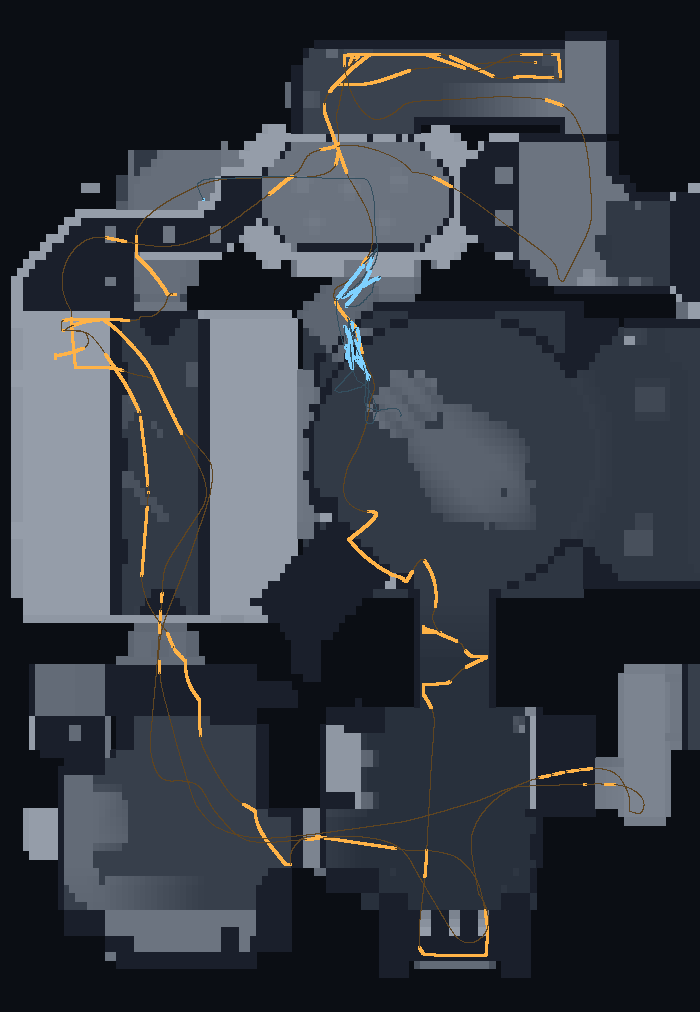
Heightmap.wax, the paths from Trajectory.wax, one marker per landing from Jumps.wax. Scrub the timeline to move through the session. Open it full page, or see how this was made.The viewer is drawing the results of those queries. It doesn’t load Jedi Academy or know how to read its level files. The floor heights came from running the game’s own collision code against the geometry in the recording.
I went into this wanting to see what putting Wax inside an existing game would involve. We got it running, played some games, and ended up building a tool I hadn’t planned on making. That is what I wanted from Wax. I can come back with a new idea after the program has finished and still have enough of it there to do something with.
The integration and queries are on GitHub, along with the tests comparing the movement with the original.